
Secure file overwriter/deleter!
Files deleted in windows are not always entirely erased from hard drive.
Rather they are erased from the file system, not drive itself.
They can be easily restored/recovered using standard recovery software.
It is highly insecure if you are dealing with sensitive information!!
This is where File Shredder comes into play!
WHAT IT DOES
————
File Shredder overwrites the contents of a file before it is deleted,
so the original data cannot be recovered with undelete or file
recovery tools. Normal deletion in Windows only removes the file’s
entry from the folder; the data itself stays on the disk until
something else happens to write over it.
File Shredder writes over it for you, guaranteeing file security.
GETTING STARTED IS SUPER EASY!
—————
Step 1) Download. compressed archive
 – to download and save fileshredder.zip to your PC.
https://doddlesoft.com/fileshredder.zip is certified as virus free @ [VirusTotal.com]
It has been downloaded . times to date (Thu 12 nov 2026).
Step 2) Extract zip file contents to your desired directory you wish to execute it from.
Step 3) Run fileshredder.exe (no installation required!)
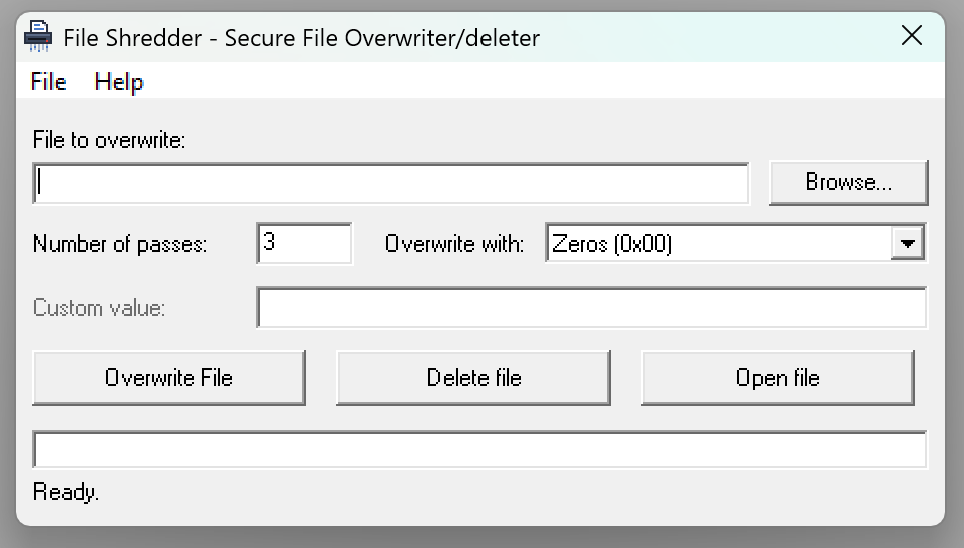
Step 4) Click “Browse…” and pick the file you want to shred, or type
its full path into the “File to overwrite” box.
Step 5) Set the number of passes and what to overwrite with (see below).
Step 6) Click “Overwrite File” and confirm.
Step 7) When it finishes, you will be asked whether to delete the file.
Click Yes to remove it.
Warning: this is permanent!
You have reached the point of no-return.
You can also start the program with a file already selected by
passing the file path on the command line, or by dragging a file onto
fileshredder.exe in Explorer:
fileshredder.exe “C:\path\to\secret.doc”
LIMITATIONS
———–
Please be aware of what any file shredder can and cannot guarantee:
– SSDs and USB flash drives: these devices move data around
internally (wear levelling), so overwriting a file may not touch
every physical copy of it. For full protection on an SSD, use the
drive’s built-in secure erase or full-disk encryption.
– Copies elsewhere: backups, cloud sync folders (OneDrive, Dropbox,
Google Drive), System Restore / Volume Shadow Copies, temporary
files and the Recycle Bin may hold other copies of the file. File
Shredder only overwrites the file you select.
– File name: the contents are destroyed, but the original file name
may remain in the file system’s records for a while after
deletion.
– Large files: files over 2 GB are not supported.
– Speed: the random options are slower than zeros or ones.
System REQUIREMENTS
————
– Windows (any version that runs Visual Basic 6 programs)
– The Visual Basic 6 runtime (MSVBVM60.DLL). This is included with
Windows XP and later, so no install is normally needed.