
A locked screen in an instant!
Whether you’re handling sensitive data at work or just stepping away from your desk, screen security shouldn’t require a second thought.Unexpected interruptions happen fast — a colleague walks over, a child wanders in, or you simply need to step away in a hurry. Every time you leave your desk, there’s likely something on your screen you’d rather others not see.
If this sounds familiar…
iLockIT pro is for you!
Because iLockIT Pro is a free Windows utility that locks your PC screen instantly with a single keyboard shortcut. It runs silently in the system tray, always ready when you need it. No bloat, no subscriptions, no fuss – just one customizable keypress and your screen is locked.
Because all it takes is a few moments for your computer to be vulnerable ….
Key Features :
iLockIT Pro launches automatically during Windows startup to the system tray so it’s always available. A system-wide hotkey works regardless of what application you’re using – the default is Ctrl+Alt+L, but you can change it to any combination you like. When triggered, it locks your screen instantly using the standard Windows lock screen. Completely free, no trial periods, no nag screens.
How to Configure Your Hotkey :
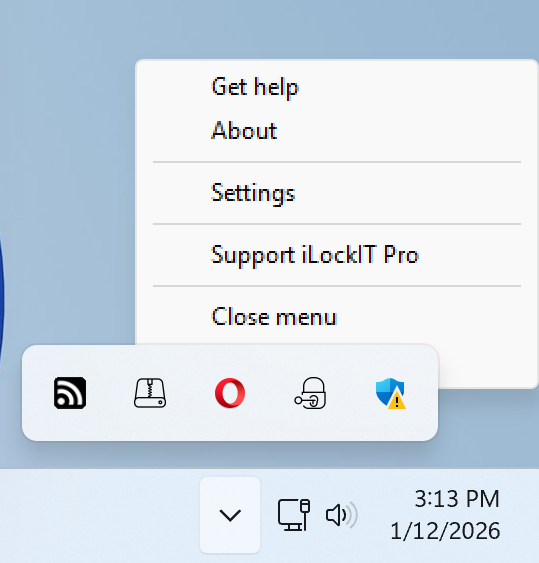
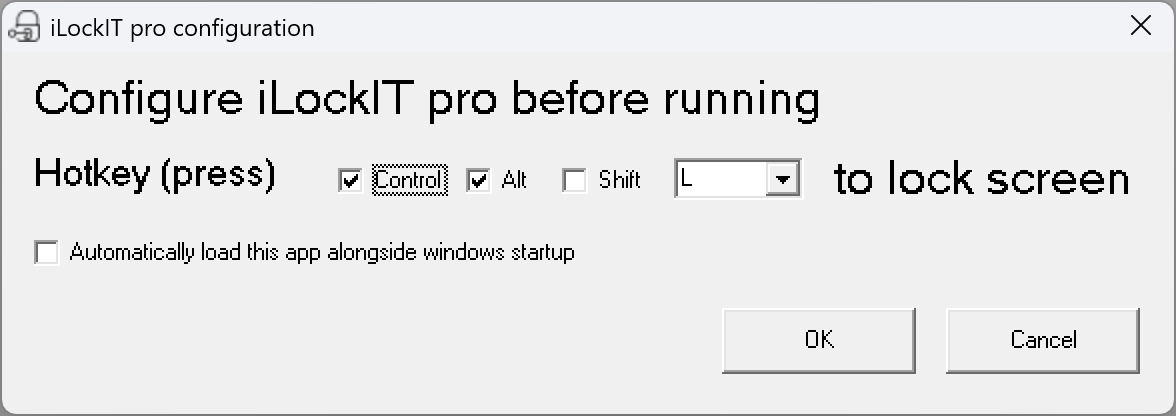
Right-click the iLockIT Pro system tray icon and open Settings. Click inside the hotkey field and press your preferred key combination. Click ok – your new hotkey is active immediately, no restart required.
iLockIT Pro in the system tray :
Configuring iLockIT pro :
System Requirements :
iLockIT Pro is compatible with a wide range of Windows operating systems, including those that run on older machines. Requirements are: Microsoft Windows XP or later (XP, Vista, 7, 8, 8.1, 10, and 11 all supported), approximately 1 MB of free disk space. Basically, any system capable of running vb6 runtimes (included), and no internet connection required after installation.
iLockIT pro has been downloaded : times.
How to Install – Step by Step :
Step 1 – Download.  – to download and save ilockitprosetup.exe to your PC.
Step 2 – Run the installer. Double-click the file and allow it to run if prompted by Windows.
Step 3 – Follow the wizard. Accept the defaults or choose your own settings, then click Install. Done in seconds.
Step 4 – Click the app shortcut. iLockIT Pro launches straight to your system tray.
Step 5 – Lock away. Press Ctrl+Alt+L at any time to instantly lock your screen.
A full record of versions, fixes, and features.
| Version | Date | Changes |
|---|---|---|
| v2.0 | 23-02-2026 |
|
Frequently Asked Questions :
Is iLockIT Pro really free?
Yes. No time limits, no premium tiers, no hidden costs – ever.
What happens when I press the hotkey?
Your screen locks instantly using the standard Windows lock screen, identical to pressing Win+L.
Will it slow down my PC?
No. iLockIT Pro has a tiny footprint and is suitable even for older or low-spec machines.
Does it start with Windows?
Yes, it launches automatically at startup so it’s always ready without any manual intervention.
Can I change the hotkey?
Yes – any Ctrl+Alt+key combination you like, set in seconds from the tray icon menu.
Is it safe to download?
Yes. The installer is verified 100% virus-free on VirusTotal, and DoddleSoft.com holds a TrustedSite security certification.
Does it work on Windows 11?
Yes. iLockIT Pro supports all versions of Windows from XP through to Windows 11.
Can I uninstall it?
Yes, via Windows’ standard Add/Remove Programs or Apps & Features – same as any other application.
Tips :
Make locking your screen a habit – it takes less than a second and protects your data every time you step away. iLockIT Pro pairs perfectly with a strong Windows login password: one locks instantly, the other keeps everyone else out. If the default hotkey doesn’t suit you, pick something your fingers can hit automatically without thinking.
Sounds good?
– to download and install iLockIT pro!